Runtime Doctrine ORM analysis with Doctrine Doctor

As developers, we're familiar with static analysis tools like PHPStan for identifying code problems. However, detecting runtime issues, especially those related to databases, requires a different approach.
This is where Doctrine Doctor comes into play. It is a Symfony bundle that extends the Symfony Web Profiler bar to analyze database queries in real-time.
What is Doctrine Doctor?
Doctrine Doctor analyzes the actual execution context of your Doctrine queries, including parameters, data volume, and query plans, to identify runtime issues such as N+1 queries, missing indexes, and MySQL configuration problems.
Installing Doctrine Doctor
To get started with Doctrine Doctor, run the following command in your terminal:
composer require --dev ahmed-bhs/doctrine-doctor
After installation, you'll see Doctrine Doctor in action in the Symfony Profiler bar.
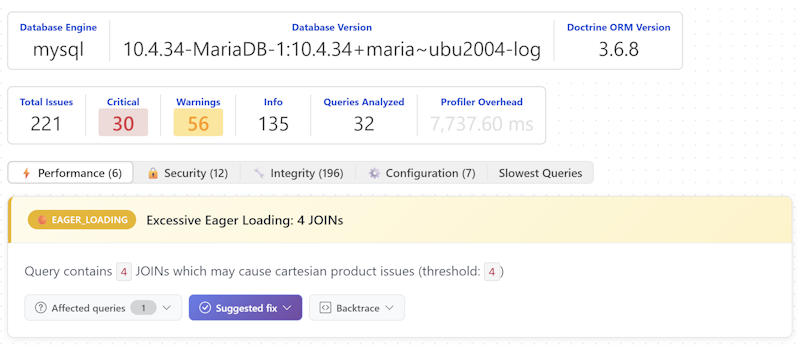
Features and Capabilities
Doctrine Doctor boasts over 90 specialized analyzers for performance, security, integrity, and configuration issues. It can detect issues like:
- Initialization problems, such as collections not being properly initialized
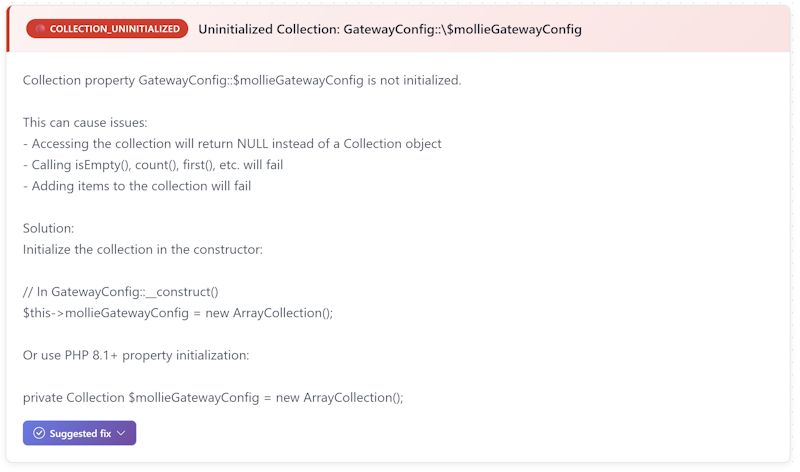
- Configuration issues, like a property storing money information using incorrect decimal places

AI Mate / MCP Integration
For automated issue detection and fixing, Doctrine Doctor offers an optional AI Mate / MCP integration. To enable this feature, update your mate/extensions.php config file as follows:
return [
    'ahmed-bhs/doctrine-doctor' => ['enabled' => true],
    'symfony/ai-symfony-mate-extension' => ['enabled' => true],
];
By following the steps outlined above, you can improve the performance and reliability of your Symfony applications. To further enhance your skills, I recommend checking out the official Doctrine Doctor documentation and experimenting with its features in your own projects.